S_FilmBurn
Description
Simulates the artifacts that occur when film doesn’t move cleanly through a camera or projector. This includes light leaks and edge bleed, leader and sprocket holes, editorial markings, and other exposed film elements. It also recreates physical imperfections such as hair, dust, and scratches, with optional film grain control.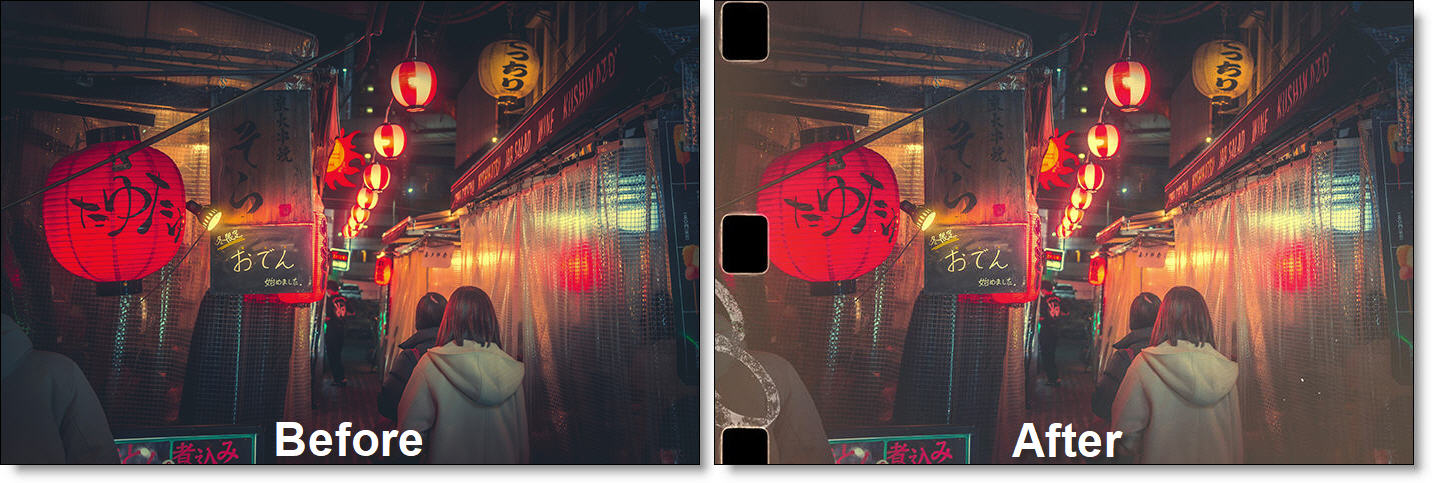
The S_FilmBurn filter comes from the Emmy award winning Boris FX Sapphire filter set.
Category
Film Lab.
Controls
Presets
To select a preset, pick one from the Presets window.
Time
The effect is advanced in time.
Flash 1–3
Enables or disables the corresponding flash element.
Size
Controls the size of the flash.
Stretch
Stretches the flash horizontally or vertically.
Rotation
Rotates the flash.
Brightness
Adjusts the brightness of the flash.
Center
Sets the center position of the flash.
Outer Color
Sets the outer color of the flash.
Inner Color
Sets the inner color of the flash.
Midpoint
Controls the midpoint of the transition between the inner and outer colors.
Softness
Adjusts the softness of the flash edge.
Shape
Sets the shape of the flash.
Circle
Creates a circular flash.
Polygon
Creates a polygonal flash.
Num Sides
Specifies the number of sides when Shape is set to Polygon. Has no effect when Shape is set to Circle.
Noise Amp
Controls the amplitude of noise distortion applied to the flash.
Noise Freq
Controls the frequency of the noise distortion.
Noise Freq Rel Y
Adjusts the relative vertical frequency of the noise.
Flicker Amp
Controls the amplitude of brightness flicker.
Flicker Freq
Controls the frequency of the flicker.
Motion Style
Determines how the flash moves over time.
Linear
Moves at a constant rate.
Wave
Moves with variable, wave-like motion.
Motion Amount
Sets the overall amount of motion.
Motion Angle
Sets the direction of motion relative to the flash center.
Motion Freq
Controls the frequency of the motion.
Motion Delay
Sets the delay before motion begins.
Leader
Enables or disables the Leader group.
Leader Style
Specifies the style of leader element.
Countdown
Film countdown leader.
Text
Text-based leader.
Sync Mark
Sync mark leader.
Leader Amount
Percentage of frames that contain leader elements.
Leader Persistence
Number of consecutive frames the leader remains visible.
Leader Opacity
Controls the opacity of the leader elements.
Leader Center
Sets the center position of the leader elements.
Leader Size
Controls the size of the leader elements.
Vary Leader Size
Randomly varies the size of the leader elements.
Vary Leader Pos X / Y
Randomly varies the X and Y position of the leader elements.
Leader Color
Sets the color of the leader elements.
Leader Glow Brightness
Controls the glow intensity of the leader elements. Requires Glow Width to be greater than 0.
Leader Combine
Determines how the leader composites with the background.
Normal
Standard composite.
Add
Adds the leader to the source.
Screen
Screens the leader with the source.
Mult
Multiplies the leader with the source.
Overlay
Overlays the leader with the source.
Stencil Luma
Uses the leader luminance as a stencil.
Leader Seed
Sets the random seed for leader generation.
Writing
Enables or disables the Writing group.
Writing Style
Specifies the writing style.
Horizontal Text
Horizontal text.
Vertical Text
Vertical text.
Wax Pencil
Handwritten notes.
Writing Amount
Percentage of frames that contain writing.
Writing Persistence
Number of consecutive frames the writing remains visible.
Writing Opacity
Controls the opacity of the writing elements.
Writing Center
Sets the center position of the writing elements.
Writing Size
Controls the size of the writing elements.
Vary Writing Size
Randomly varies the writing size.
Vary Writing Pos X / Y
Randomly varies the X and Y position of the writing elements.
Writing Color
Sets the writing color.
Writing Glow Brightness
Controls the glow intensity of the writing elements. Requires Glow Width to be greater than 0.
Writing Combine
Determines how the writing composites with the background using Normal, Add, Screen, Mult, Overlay, and Stencil Luma modes. See Leader Combine above for descriptions of the modes.
Writing Seed
Sets the random seed for writing generation.
Edges
Enables or disables the Edges group.
Edges Style
Selects the sprocket style.
Sprockets Vertical A
Six vertical sprockets.
Sprockets Vertical B
Ten vertical sprockets.
Single Vertical Sprocket
Single sprocket.
Edges Center
Sets the sprocket position.
Edges Size
Controls the sprocket size.
Vary Edges Pos
Randomly varies the sprocket position.
Edges Outline Color
Sets the sprocket edge color.
Edges Center Color
Sets the sprocket hole color.
Edges Glow Brightness
Controls sprocket glow intensity. Requires Glow Width to be greater than 0.
Edges Outline Combine
Composite mode for sprocket edges using Normal, Add, Screen, Mult, Overlay, and Stencil Luma modes. See Leader Combine above for descriptions of the modes.
Edges Center Combine
Composite mode for sprocket centers using Normal, Add, Screen, Mult, Overlay, and Stencil Luma modes. See Leader Combine above for descriptions of the modes.
Scratches
Enables or disables the Scratches group.
Scratches Amount
Controls the number of scratches in each layer.
Scratches Length
Controls the length of scratches in each layer.
Scratches Width
Sets the base width of all scratches.
Vary Scratches Width
Randomly varies scratch width. Set to 0 for uniform width.
Scratches Opacity
Controls scratch opacity.
Scratches Roughness
Controls edge irregularity.
Scratches Rough Freq
Controls the frequency of scratch roughness.
Gaps
Simulates intermittent breaks in scratches caused by rolling debris.
Gaps Frequency
Controls how often gaps occur.
Scratches Area Center
Sets the horizontal center of the scratch region (0 = center, -1 = left edge, 1 = right edge).
Scratches Area Width
Sets the width of the scratch region (1 = full frame).
Weave Amount
Controls horizontal wandering of scratches. A value of 0 produces straight vertical scratches.
Weave Frequency
Controls how quickly scratches weave.
Scratches Color
Sets the scratch colors.
Scratches Combine
Composite mode for scratches using Normal, Add, Screen, Mult, Overlay, and Stencil Luma modes. See Leader Combine above for descriptions of the modes.
Hairs
Enables or disables the Hairs group.
Hairs Amount
Number of hairs visible per frame.
Hairs Persistence
Number of frames hairs remain visible.
Hairs Wiggle Amp
Amount of random movement and stretching.
Hairs Wiggle Freq
Frequency of wiggle motion.
Hairs Size
Scales hair size.
Vary Hairs Size
Randomly varies hair size.
Hairs Opacity
Controls hair opacity.
Hairs Color
Sets hair color.
Hairs Combine
Composite mode for hairs using Normal, Add, Screen, Mult, Overlay, and Stencil Luma modes. See Leader Combine above for descriptions of the modes.
Stains
Enables or disables the Stains group.
Stains Density
Average number of stains per frame. Fractional values represent the probability of a single stain appearing.
Stains Size
Controls stain size.
Vary Stains Size
Randomly varies stain size.
Stains Opacity
Controls stain opacity.
Stains Color
Defines the color range for stains.
Stains Combine
Composite mode for stains using Normal, Add, Screen, Mult, Overlay, and Stencil Luma modes. See Leader Combine above for descriptions of the modes.
Dust
Enables or disables the Dust group.
Dust Density
Average number of dust particles per frame. Fractional values represent the probability of a single particle appearing.
Dust Size
Controls dust size.
Vary Dust Size
Randomly varies dust size.
Dust Opacity
Controls dust opacity.
Dust Color
Defines the color range for dust particles.
Dust Combine
Composite mode for dust using Normal, Add, Screen, Mult, Overlay, and Stencil Luma modes. See Leader Combine above for descriptions of the modes.
Grain
Enables or disables the Grain group.
Grain Amp
Controls overall grain intensity.
Grain Size
Scales grain size. Adjust when changing resolution.
Grain Blur
Softens the grain. Higher values produce coarser grain.
Grain Amp Darks
Relative grain amount in dark regions.
Grain Amp Mids
Relative grain amount in midtones.
Grain Amp Brights
Relative grain amount in bright regions.
Grain Mono
Uses the same grain pattern for all RGB channels.
Elements Glow
Glow Width
Controls overall glow spread for writing, leader, and edges. The corresponding Glow Brightness parameter must be increased for visible results.
Glow Width Red / Green / Blue
Controls glow spread per color channel.
Seed
Initializes the random seed generator.