

















BCC Twirl
Category: BCC Warp
Effect Name: BCC Twirl
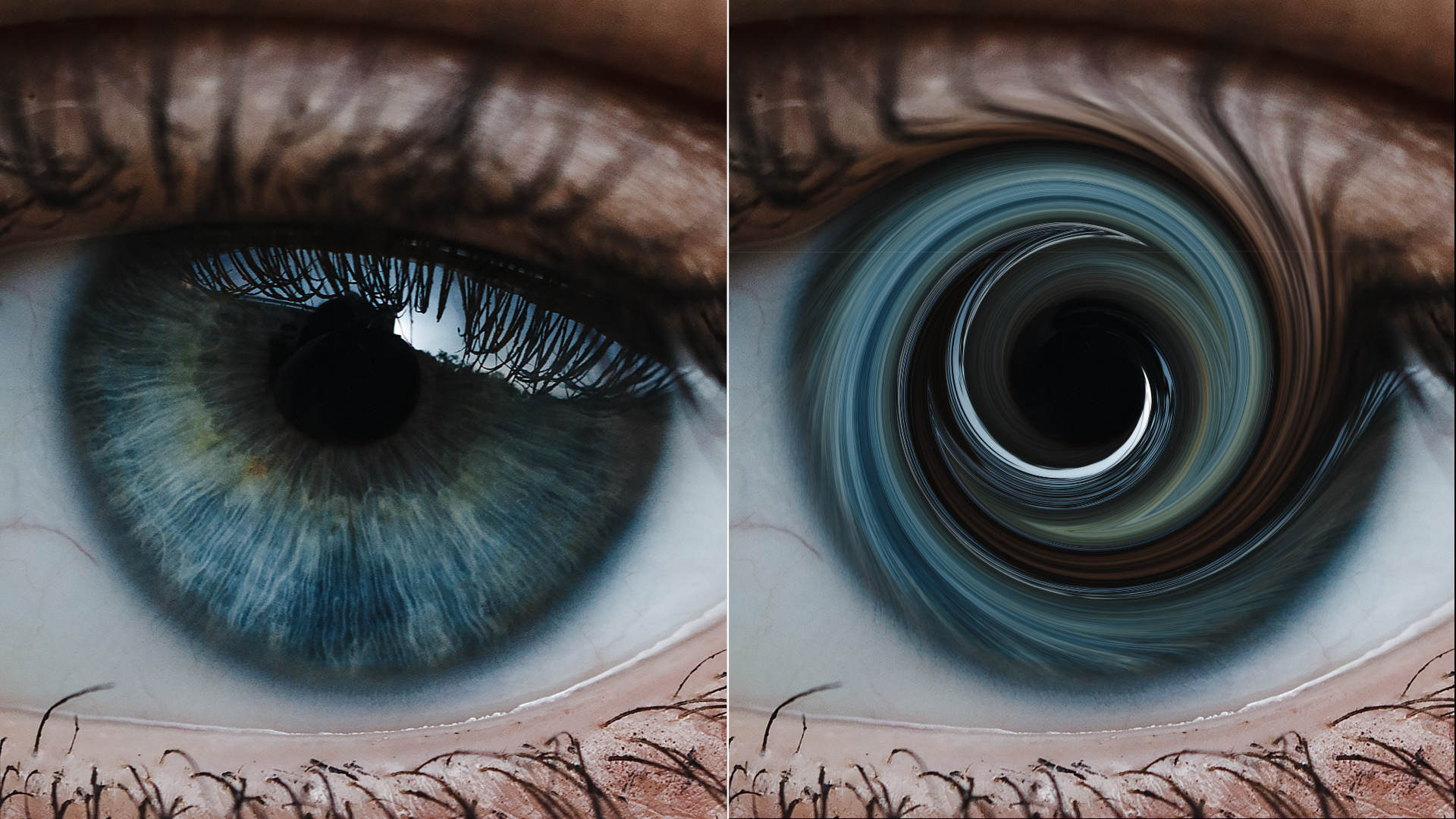
The BCC Twirl filter, part of the BCC Warp category, spins the image around a center point, creating a spiral of distortion.
Working with the Filter
Presets and Common Controls
- BCC filters come with a library of factory installed presets plus the ability to create your own custom presets and preview them with the BCC FX Browser™.
- BCC filters also include common controls that configure global effect preferences and other host-specific effect settings.
For more information about working with presets and other common controls, Click Here.
Effect Controls
Mocha Mask and Track
Continuum effects include integrated masking and matte tools that allow you to restrict the effect to specific regions of the image.
- Mocha masks: used to create custom spline masks. Mocha also includes Matte Assist ML and Matte Refine ML, which use machine learning to generate and track masks.
- Pixel Chooser: used to generate geometric shapes, gradients, or mattes based on channel, luma, or color-based selections. Additionally, an AI depth map generator, and an AI-powered face detection model allow for precise control of masks and mattes.
Note: Mocha can also be used to drive geometric parameters. See the Mocha Motion Tracker documentation for details.
For more information, see Mocha and Pixel Chooser.
Beat Reactor
The Beat Reactor is an audio-driven animation system that links effect parameters to an audio track. This allows visual effects to react dynamically to sound without manual key-framing.
For more information, see Beat Reactor Documentation.
Motion Tracker
The BCC Motion Tracker allows you to track the motion of an object, then use the motion path to drive other geometric properties of the effect without the need for keyframing.
For more information on the Motion Tracker, Click Here.
- Process Alpha Only: Distorts the alpha channel without changing the underlying colors. Twirl Center: Sets the center of the twirl effect along the X and Y axis.
- Twirl Style: Determines the shape of the twirl effect. Each style uses the Twirl Angle and Twirl Radius parameters slightly differently.
- Linear: Displaces pixels to the specified Twirl Angle at the Twirl Center point. The displacement of the pixels decreases evenly as their distance from the center decreases, and pixels are not displaced at all beyond the Twirl Radius.
- Wide: Similar to Linear, but applies more displacement to pixels near the Twirl Radius. This creates a wider twirl.
- Narrow: Similar to Linear but applies more displacement to pixels near the Twirl Center point. This creates a narrower twirl.
- Two Way: Begins displacing pixels outside the Twirl Radius in the direction of the Twirl Angle. As the distance to the center of the effect decreases, the displacement increases until the Twirl Radius is reached. At the Twirl Radius, pixels are displaced fully in the Twirl Angle direction. Between the Twirl Radius and the Twirl Center, pixels are displaced increasingly in the direction opposite the Twirl Angle. At the Twirl Center point, pixels are displaced fully to the opposite of the Twirl Angle.
- Outside Soften: Softens the transition between the twirl and the undistorted region.
- Inset: Determines the radius value at which the twirl achieves its maximum displacement. Increasing positive values move the peak displacement area away from the center of the twirl, which can create an undistorted region in the center. Negative values create effects similar to those produced by reducing the Twirl Angle value.
- Aspect: Stretches the Twirl. Positive values stretch the twirl horizontally, while negative values stretch the twirl vertically.
Note: If Inset is greater than 0, Inside Falloff controls the length or the transition between fully displaced pixels in the twirl and the unaffected pixels. If the Inset value is greater than the Inside Falloff value, an undistorted region in the center of the effect is created. If Inset is 0 or a negative value, Inside Falloff has no affect.
Motion Tracker / Mocha Group
The BCC Mocha Motion Tracker allows you to track the motion of an object, then use the motion path to drive other geometric properties of the effect without the need for keyframing.
For more information on the Motion Tracker, Click Here.
Distortion Pinning
The BCC Distortion Pinning controls are used to fine tune edge treatment in situations where a distortion effect might cause regions from outside the image edges to be remapped inside the boundary.
For more information on the BCC Distortion Pinning controls, Click Here.
