

















BCC Pencil Sketch
Category: BCC Art Looks
Effect Name: BCC Pencil Sketch
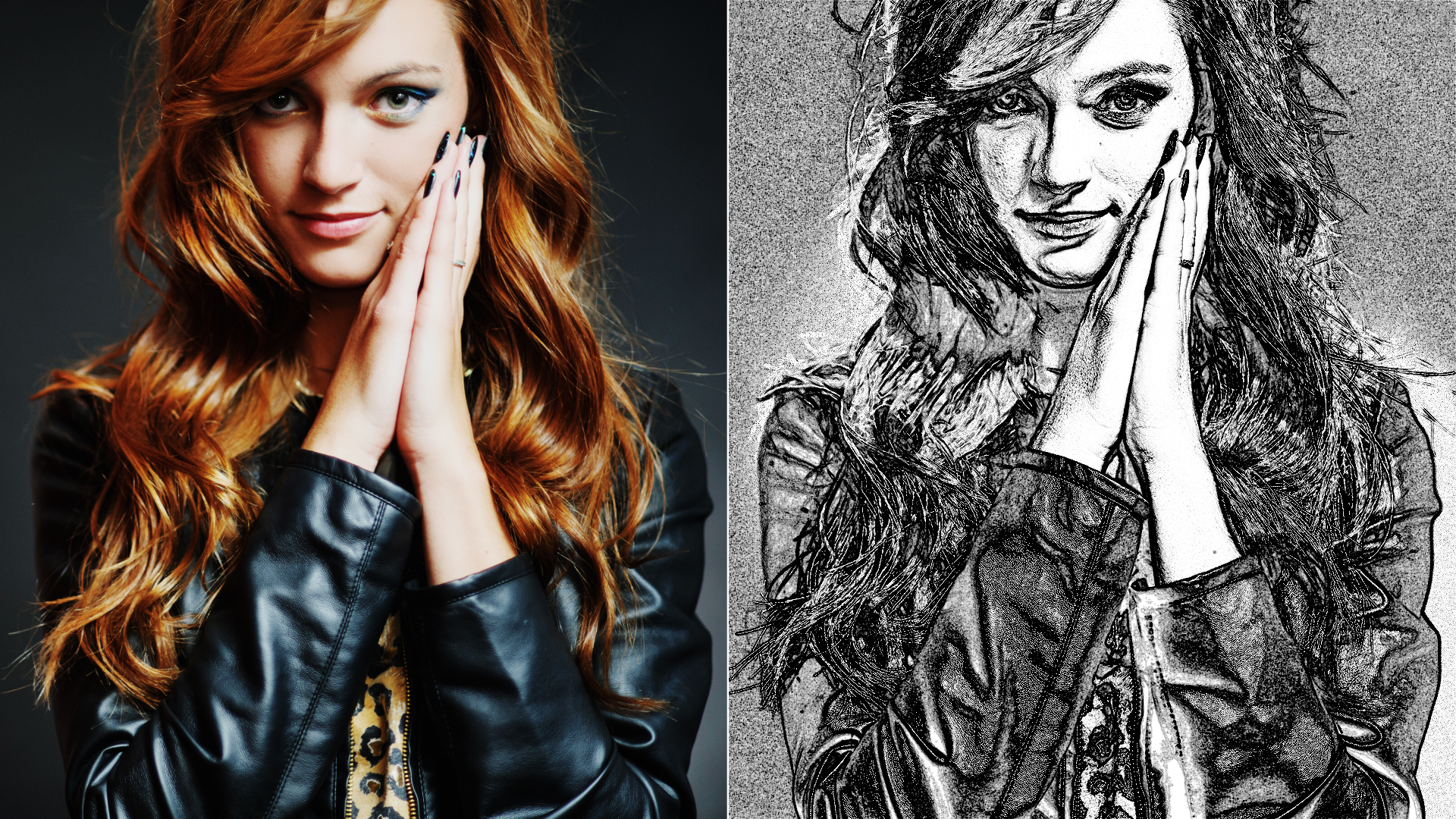
The BCC Pencil Sketch filter, part of the BCC Art Looks category, takes input from an image clip and converts this into a hand-drawn pencil sketch style animation.
Working with the Filter
Presets and Common Controls
- BCC filters come with a library of factory installed presets plus the ability to create your own custom presets and preview them with the BCC FX Browser™.
- BCC filters also include common controls that configure global effect preferences and other host-specific effect settings.
For more information about working with presets and other common controls, Click Here.
Effect Controls
Mocha Mask and Track
Continuum effects include integrated masking and matte tools that allow you to restrict the effect to specific regions of the image.
- Mocha masks: used to create custom spline masks. Mocha also includes Matte Assist ML and Matte Refine ML, which use machine learning to generate and track masks.
- Pixel Chooser: used to generate geometric shapes, gradients, or mattes based on channel, luma, or color-based selections. Additionally, an AI depth map generator, and an AI-powered face detection model allow for precise control of masks and mattes.
Note: Mocha can also be used to drive geometric parameters. See the Mocha Motion Tracker documentation for details.
For more information, see Mocha and Pixel Chooser.
Compare Mode
The Compare Mode is used to view the filtered result alongside the original source layer. Several split-screen and side-by-side display options are available.
For more information, see Compare Mode.
- View:
Determines what is displayed.
- Output: Displays posterized background and generated lines.
- Background: Displays only posterized background.
- Lines: Displays only generated lines.
- UnMasked Lines: Displays generated lines bypassing Line Matte.
- Cartoon Matte: Displays matte used for posterization.
- Temporal Smoothing:Enables smoothing of the filter result over time.
- Soften:Softens / smooths the image before lines are drawn.
- Line Style:
Sets the width of the sketched lines.
- Light
- Medium
- Heavy
- Line Threshold:Sets the base threshold value for line generation.
- Line Width:Attenuates the width of the lines.
- Line Soften:Controls softness of the pencil lead.
Advanced Group
- Boost Contrast:Boosts contrast of the input image.
- Soften Max Deviation:Fine-tunes the master soften parameter.
- Soften Iterations:Applies multiple passes of softening.
Lines Group
- Intensity:Increases intensity of rendered lines.
- Gamma:Makes lines more prominent.
- Thicken:Makes lines thicker.
- Blur:Applies blur to lines.
- Contract/Expand:Adjusts width of lines.
- Boost Dark Pixels On:Enhances detail in shadow regions.
Boost Dark Pixels Group
- Cutoff:Sets value above which dark pixels are boosted.
- Soften:Softens threshold value.
- Boost Lines:Darkens existing lines.
- Add to Lines:Adds additional lines to dark pixel regions.
Line Matte Group
- Line Matte On:Enables Line Matte cleanup function.
- Local Diffs. On:Uses difference modes to generate more detail.
- Apply When:
- Prefer Darker
- Prefer Lighter
- Diff Threshold:Sets cutoff for difference modes.
- Diff Scale:Multiplies difference result.
- Luma On:Enables luma-based matte.
- Luma Threshold:Sets luma cutoff.
- Luma Mode
- Prefer Darker
- Prefer Lighter
- Luma Distance:Flattens pixel values.
- Luma Scale:Brightens luma distance result.
- Smooth Matte:Blurs Line Matte.
- Choke Matte:Expands or contracts Line Matte.
- FG Opacity:Controls foreground opacity.
- FG Color:Sets foreground color.
- BG Opacity:Controls background opacity.
- BG Color:Sets background color.
- Reverse Colors:Swaps FG and BG colors.
- Apply Mode:Blends filtered result into original image.
- Apply Mix:Blends selected apply mode with normal mode.
- Mix With OriginalBlends the source and filtered images. Use this parameter to animate the effect from the unfiltered to the filtered image without adjusting other settings, or to reduce the effect of the filter by mixing it with the source image.
