

















BCC+ Deinterlace ML
Category: BCC Image Restoration
Effect Name: BCC+ Deinterlace ML
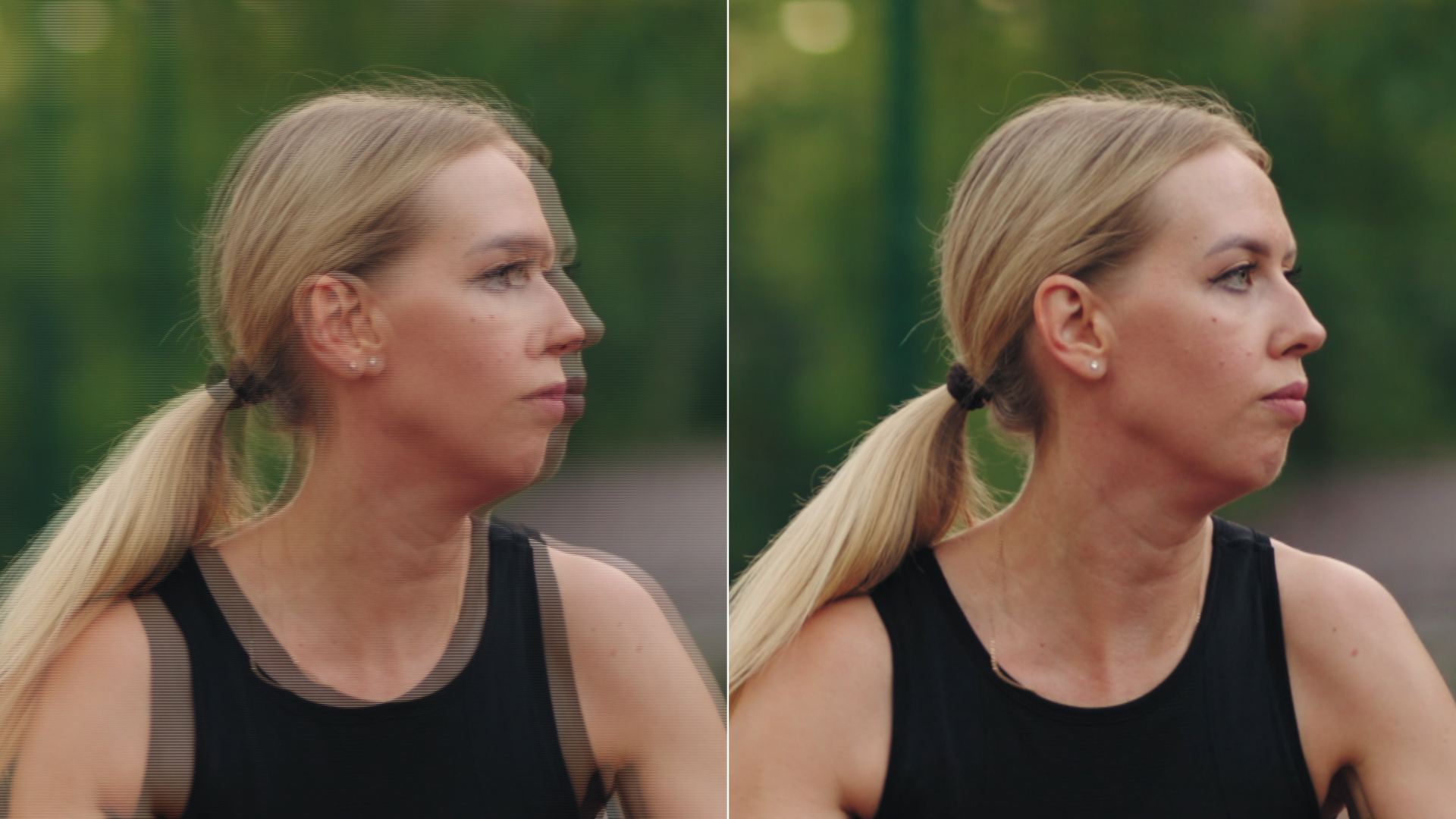
The BCC+ Deinterlace ML filter, part of the BCC Transitions category, converts interlaced video clips into progressive-scan frames, such as footage shot on film. BCC+ Deinterlace ML can render “simulated TeleCine” style by adding 3:2 pulldown to the result. This filter can also convert 29.97fps NTSC video into 24fps film-style frames.
The filter will automatically scan the filtered source to determine the correct field order and set the filter to generate the correct progressive frame result.
Working with the Filter
FX Editor and Presets
- Use the FX Editor to load or save presets for reuse.
- To load a preset: Open the FX Editor, select a preset from the Presets panel, and click Apply to return to the host application.
- To save a custom preset: While in the FX Editor, click the Create Custom Preset icon in the parameter list, enter a preset name, and click Done. Additionally, a custom preset can be saved from the main menu bar by selecting File->Save Preset.
- To import custom presets from another drive: While in the FX Editor, select File->Import Preset from the main menu bar.
Effect Controls
Compare Mode
The Compare Mode is used to view the filtered result alongside the original source layer. Several split-screen and side-by-side display options are available.
For more information, see Compare Mode.
- View: Determines the output of the filter.
- Output: Displays the final rendered effect.
- View Motion Mask: Displays a black-and-white motion mask showing where interpolation will occur. White pixels will be interpolated, black pixels will remain unchanged.
- Operation Determines which interpolation method the filter performs.
- Only Deinterlace: Converts interlaced video to progressive frames without altering the frame rate. This helps remove combing artifacts.
- Simulate Pulldown: Simulates the 3:2 pulldown effect used when converting film to NTSC video. The filter selects the fields closest in time to the target 24 fps frames and assembles them into a pulldown pattern.
- 29.97i → 23.976p: Creates film-rate progressive frames from interlaced NTSC footage.
- Input Field Order: Sets the input field order to match the source footage. Select from Upper or Lower field order.
- Method: Determines method the filter uses for deinterlacing the footage.
- Interpolate: Uses the legacy deinterlacing method.
- Simulate Pulldown: Uses the machine learning algorithm to detect frames and convert.
- Motion Sensitivity: Determines the threshold of the motion detection mask. Higher values cause more pixels to be interpolated.
- Motion Detection Size: Determines the number of pixels analyzed when detecting interlace artifacts. Larger values improve artifact detection but may reduce image detail.
- Max Interpolation Slant: Determines how diagonal edges are analyzed during interpolation.
- ML Model: Determines the type of ML model used for analysis.
- Faster: Prioritizes faster rendering in favor of accuracy.
- Better: Prioritizes accuracy over faster rendering.
- Pulldown: Selects the pulldown cadence when simulating pulldown using "W" (whole) and "S" (split) frames to map frames across video fields and prevent motion jitter. Available patterns:
- WWWSS
- WWSSW
- WSSWW
- SSWWW
- SWWWS
- Output Field Order:Determines output field order when pulldown simulation is used. Select from Upper or Lower field order.
- GPU Rendering:Specifies how the effect is rendered.
- Default: Uses product-wide default of 16 bit half-float GPU rendering.
- 16 Bit Float: Manually force 16 bit half-float GPU rendering.
- 32 Bit Float: Manually force 32 bit full-float GPU rendering.
- Disabled: Forces CPU rendering.
