 Marco Sebastiano Alessi |
May 22, 2026
Marco Sebastiano Alessi |
May 22, 2026


It often happens that artists have old recordings they want to re-release, but since they don’t have access to the original stems, and re-recording them would be time-consuming and costly, they abandon the project right away. Stem separation tools let you split a stereo song into multiple stems to create remixes, enhancing each stem and enabling you to release remastered versions of your old songs more quickly.
These tools are also helpful to isolate vocals or instruments, such as drums, for use in videos, karaoke tracks, band practice, or DJs' mixes.
In today’s article, you’ll learn how to remove drums from a song in a few clicks with CrumplePop by Boris FX.
Let’s dive in!
Remove Drums from a Song with CrumplePop SoundApp

The CrumplePop standalone audio app, SoundApp, includes some helpful new features. The new Demix processing tool includes AI models that extract, rework, and remove audio fast and easily. For this tutorial, we’ll use the Music 4 Stems AI model to remove drums from a song by splitting it into four stems: Drums, Bass, Other (guitar, synth, or melodic element), Voice.
CrumplePop SoundApp is available for Windows and Mac computers. It processes your audio locally on your computer - so no cloud uploads, waiting, or credits needed. You can download the free trial to follow along with me in this tutorial.
Step 1: Open Your Song File
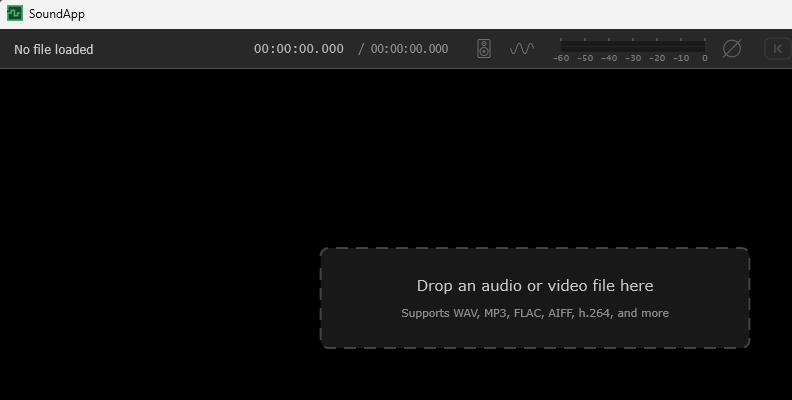
Launch the SoundApp and click to open a file, or drag the song audio file into the SoundApp to remove the drums from the song.
Step 2: Select the Demix
Once the song is loaded into the app, ensure the Demix mode is chosen from the top menu bar.
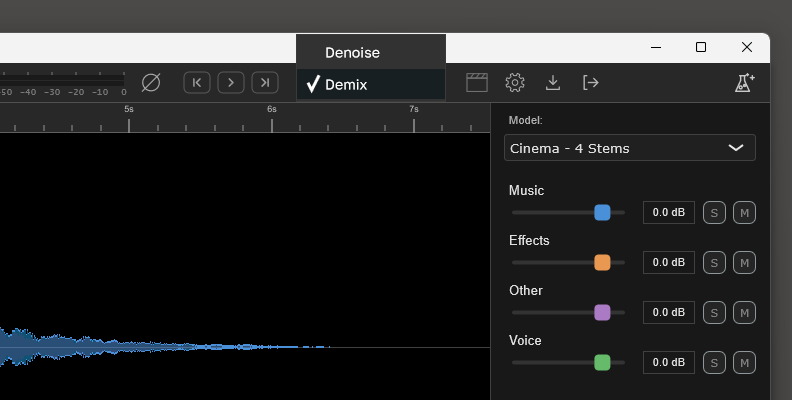
If you see “Denoise”, just click to display the dropdown menu and change it to “Demix” to access the AI models and the separate instruments feature.
Step 3: Select Music 4 Stems
In the right panel, you can select AI models tailored for specific demixing needs. Choose “Music 4 Stems” to isolate the song into four stems.
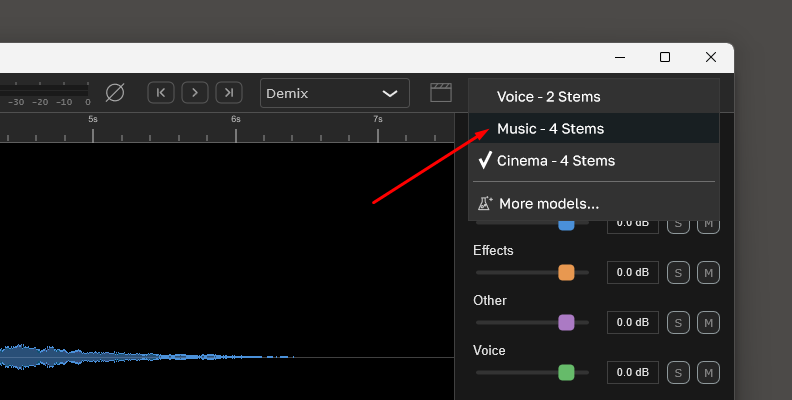
If you don’t see it on the list, click “more models” to see more AI models to install. Find and install Music 4 Stems and close the window. It should now appear in the model list. Simply select it to start processing the audio file.
Step 4: Remove Drums
Once the Music 4 Stems is selected, wait for the SoundApp to finish analyzing your audio file. After it’s finished, you’ll see the waveform in different colors. Each color is a stem in which your audio file was split.
You have the audio file separated into four stems: Drums, Bass, Other, and Voice. To remove the drums from that song, simply click the M button to mute that stem entirely.
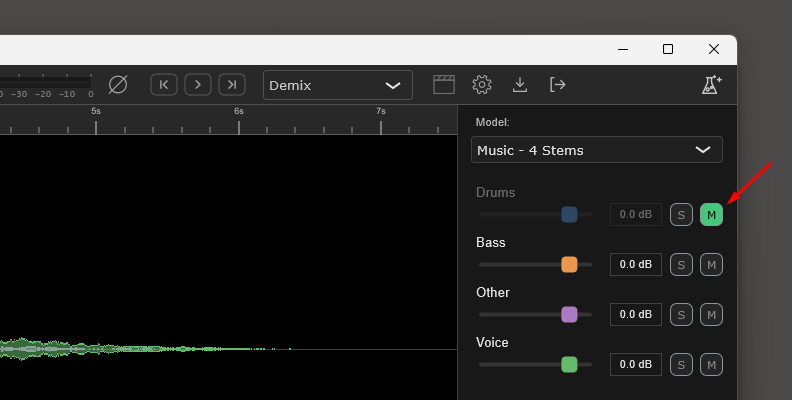
You can also move the slider to the left to reduce the volume.
Step 5: Create a Custom Mix
Next, you can adjust the volume levels of the other three stems or solo a specific track to create a custom mix for your practice. If you want to create a separate track without vocals or guitars, mute the corresponding Voice and Other stems.
Step 6: Export Audio
Now you’re ready to export the clean audio tracks, ready to play with for your band’s practice or for your DJs' mixes.
The export process is pretty simple. Click the Export icon, which is the last button in the top right corner of the menu bar.
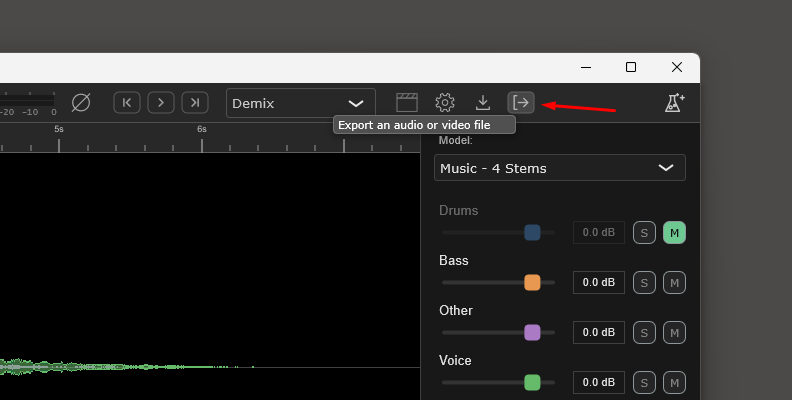
In the export window, you can select to export each stem individually, all stems, or the mixdown. For removing drums, select the mixdown to export the track with the drums muted. Choose your preferred audio format, then click Export to save the new audio file without the drums.
Best AI Tool to Remove Drums from Songs
Nowadays, we have several tools that can help us remove drums from our favorite songs. Whether you are a drummer who wants to cover your favorite songs, a DJ who wants to isolate drums from the rest of the instruments, or just doing it for fun, here are the best AI tools to remove drums from a song.
CrumplePop

CrumplePop by Boris FX is an AI-powered tool that has transitioned from a purely restoration tool to an AI stem-separation powerhouse. Early versions focused on noise removal, such as echo, traffic noise, and wind noise. In the 2026 release, it now targets demixing finished stereo tracks into stems. Unlike many other AI stem separation tools, CrumplePop processes everything locally on your computer, without cloud uploads, credit costs, or privacy concerns.
LALAL.AI

LALAL.AI is one of the most popular AI stem separation tools online and remains a titan in the web-based stem separation market. It’s a cloud-first service that offers a wide range of instrument extractions, including strings and wind instruments. It operates on a pay-per-minute basis or via a subscription plan.
Stemify

Stemify is a branch of the well-known eMastered AI mastering engine, offering an “all-in-one” solution for producers seeking an easy way to split tracks and master in a single workflow. It offers six instrument separation types: drums, vocals, guitar, bass, piano, and others. Stemify is included in the eMastered Studio as a yearly or monthly subscription.
Moises App

Moises.ai is an app designed as a full practice and performance platform, with powerful AI stem separation, which is very popular among drummers, vocalists, and music students due to its mobile-first approach. For drums, Moises even offers separations for individual drum parts, such as cymbals, snares, and the kick drum, as well as other features to change the tempo, pitch shift, loop, and key and chord detector.
Remusic

Remusic has quickly positioned itself as a fast and accessible alternative for AI-based stem separation. It started as a vocal remover and then expanded into a multi-stem splitter, focusing on ease of use and a friendly interface. It uses a credit system to access AI stem separation and features basic extractions of vocals, drums, bass, guitar, and piano.
MuteDrums

MuteDrums is a very simple online drums removal tool. It’s designed to strictly remove drums from the song, with the rest of the instruments isolated to a separate track. So you can only export one drumless track and the isolated drums. This is a tool focused more on practice and on users who don’t seek clean stems for music production.
Final Words
AI stem separation has come a long way from those phasey, distorted results it produced a few years ago. These tools have now advanced to produce clean, high-quality stems from a finished stereo track with minimal artifacts and bleed. Incorporating professional tools like CrumplePop into your audio workflow can help you not only split a track into stems but also clean your audio of unwanted noise, treat and adjust each stem, and export them individually for use in other DAWs or video editing software.
You can try CrumplePop SoundApp for free and get access to all its features, including the ARA plugin version for compatible audio software.
Good luck!