 JG McQuarrie |
July 17, 2026
JG McQuarrie |
July 17, 2026


Whether you're an amateur mash-up artist or a serious music production professional looking to find new ways of working with music, stem separation tools have become an invaluable part of the creative process. But what is stem separation, how does it work, and what's the best software to use for it?
Come with us now as we explore the world of stem separation and what software can give you the best results.
What Is Stem Separation?

Stem separation is the process of taking a completed song and breaking it back down into its individual parts. This is also sometimes referred to as music source separation or stem splitting.
Think of it like this. When a song is recorded, all the individual elements are combined in a DAW (digital audio workstation), then mixed and mastered to create a final track. All the parts - vocals, instruments, and so on - get blended into one to create the final song you listen to.
Stem separation does the opposite of this. It takes the completed track and breaks it down into separate parts - these parts are referred to as "stems", hence the term stem separation.
It does this by utilizing an AI driven process and deep machine learning algorithms to analyze and break apart the track you want to work on. These have been trained on thousands of professionally mixed tracks to achieve the best results. The AI breaks down the track and produces the stems you want, the most common of which are vocals, drums, bass, and others.
The depth of processing is something that really matters too. This refers to how much time your system spends analyzing, deconstructing, and processing the audio. This significantly affects how good the quality of separation is - the slower it is, the better the result it will have.
So stem separation will take your track, break it down into its component elements, and let you play with and manipulate those components as much as you want.
5 Best Stem Separation Software 2026
1. CrumplePop Stem Separation (SoundApp Demix)

When it comes to professional, high-quality software, CrumplePop is always a go-to, and stem separation is no different. The CrumplePop SoundApp has AI stem separation built in, and it's incredibly simple to use yet incredibly powerful.
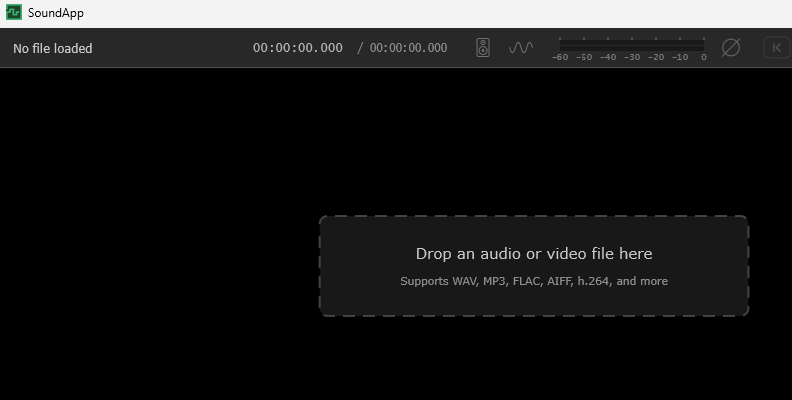
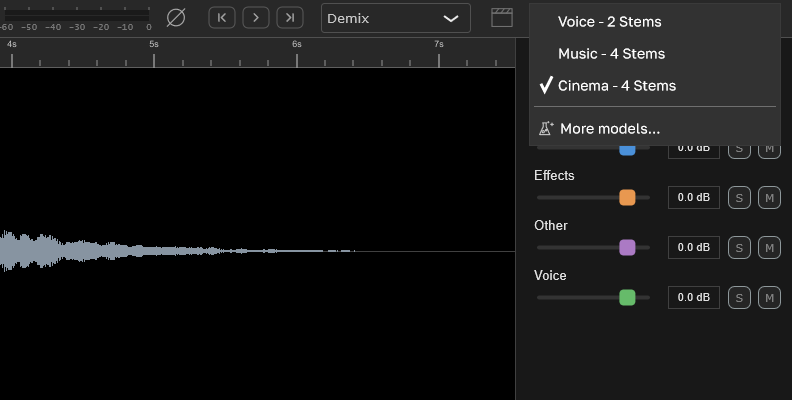
You can choose from a range of different stem settings, including two stems for voices, four stems for music, and four stems for cinema, allowing you to demix in any number of ways to help you get the best results.
Simply drag and drop the file you want to apply stem separation to, choose the stem splitter model that you want, then let CrumplePop work its magic.
And unlike some AI stem separation tools, the CrumplePop SoundApp is relatively light on processor power and is GPU accelerated, so your computer won't drag itself to a standstill while the stem separator is running, meaning you'll get results incredibly fast.
CrumplePop always produces great quality software, and with stem separation, they've done it again. Speedy, easy to use, and with great results, it cannot be recommended enough.
Cost: $25.00 monthly / $345 permanent subscription. Both include the full range of CrumplePop audio restoration plugins in addition to the SoundApp.
2. Logic Pro
Apple's mighty Logic Pro has been around for a long time, but it keeps on getting better and better. And that now includes stem separation as a built-in part of the software.
The stem separation is powerful and does a great job of pulling apart pretty much any track you can throw at it, and the latest version enhances this further. You can select any part of the audio region and select what stems you want to extract from the song, which is especially handy for long tracks you don't need to extract everything from.
Logic Pro is also powerful enough to separate other instruments, not just the traditional four, meaning it's great at being able to pull apart guitar and piano, and the vocal remover remains top tier in an environment littered with software that also makes that claim.
If there's a downside to Logic Pro, it's that you need Apple Silicon to run it on - if you have an Intel Mac, you're out of luck. That's because Logic Pro (and its stem separation ability) requires a lot of power, so you need a bit of heft to your processor to get the best from it.
And of course, Logic Pro is Mac only, so if you're on Windows, you're out of luck. But if you have a Mac with an Apple Silicon processor, Logic Pro is an incredibly powerful stem separation tool.
Cost: $199.99
3. LANDR Stems
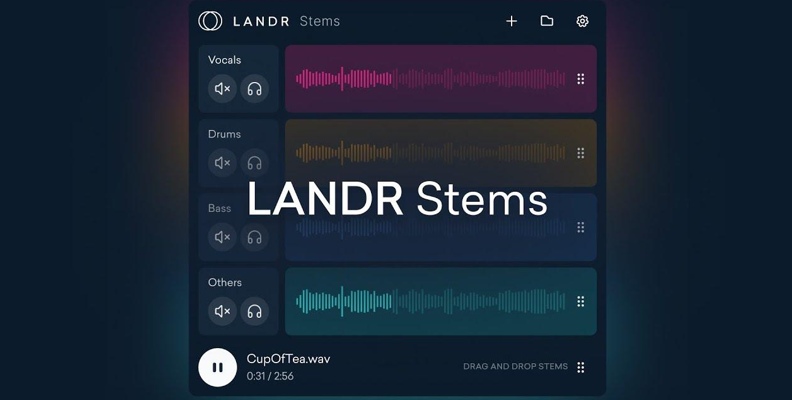
LANDR Stems are slightly different from the previous two examples, in that it's a plugin that you can add to any DAW (digital audio workstation) as if it were an instrument. The plugin provides an interface that allows you to upload your file to the LANDR stem separation service, where its software works its magic, then pulls the separated stems back into the project you're working on.
There's very little control you have over the process, and the range of options is practically non-existent, which you think would be a problem. However, the results from LANDR are remarkably good. Separation is clean and clear, with few artifacts leaking into the separated stems.
Bass, always a problem for stem separation, comes through particularly well, and it's great to see a stem service that manages to get such good results from the low end. But other instruments sound good too, and vocals come out clearly and with little distortion.
While the plugin approach that LANDR takes might seem a little odd -because it is - the results nevertheless justify the approach, and LANDR produces great stem separation with little user intervention, making it ideal for anyone starting out.
Cost: There's an Essentials plan at $13.00/m, a Standard at $20.00/m and a Pro plan at $25.00 (which includes other parts of the LANDR software suite). You can also make yearly payments, which brings the cost down to $8.25, $12.00, and $16.00 respectively. The plugin is available in AU, AAX, and VST3.
4. LALAL.AI/h3>
LALAL.AI began life providing online services for stem separation, but has now developed into having its own app for both Windows and Mac (and Android and iOS!). And while neither the app nor the website is the most advanced or easy-to-use interface, there's no doubting the quality of the results.
LALAL.AI is based on a proprietary neural net called Perseus, which means they're not dependent on other AI models for stem separation. You can choose from a remarkably wide variety of instruments, and unusually, there are other stems that include classic instruments like strings and wind, as well as the usual collection of acoustic guitars, bass, drums, and so on.
There's also an inbuilt Voice Clean, De-Echo, and Noise Cancellation team to help you clean up any stems that might require them. While their quality is very good, they're not quite on a par with CrumplePop's audio restoration plugins, though they will get the job done.
LALAL.AI is a great tool for anyone looking to get excellent results from their stem separation, and thanks to the number of platforms it's available for, pretty much anyone can get started, whatever OS you're using.
Cost: LALAL.AI charges by time rather than by license. So there's the free tool, which will get you ten minutes of stem separation to dip your toe in the water. A Lite tier will set you back $7.50/m for 90 minutes in their "fast" queue and Unlimited in their "relaxed" queue, and the Pro tier is $15.00/m for 250 minutes in the fast queue and Unlimited in the Relaxed queue.
5. Gaudio Studio

If you need to do stem separation on the go, Gaudio Studio is a great option. They're available via browser or for iOS and Android, so if you're out and about, you're going to be covered one way or the other.
Gaudio Studio uses something called the Gaudio Source Separation to achieve stem separation. It does a great job of splitting out stems, even when the original source isn't as high quality as it should be.
It also features a Vocal Remover, which, well, removes vocals, as well as having a Noise Reduction option, to keep things as clean as possible for the separated stem. The website has a few other options to keep your stems as artifact-free as possible, and both the website and the app are simple to use without sacrificing the quality of the results.
If you need high-quality stem separation on the go, you can't go too far wrong with Gaudio Studio.
Cost: Another company that charges by time, you get a free 20 minutes for testing any stuff you want to try out, then it's $7.00 for 50 minutes, $16 for 200 minutes, and $79 for 1200 minutes.
What Are the Limits of Stem Separation?

While stem separation can be an incredibly powerful tool, there are some limitations, even when using the best stem separation tools.
Artifacts
When separating a song into stems, it's common for "artifacts" to appear. These can range from leakage from other parts of the track (i.e., despite the stem separation, you can still make out other elements of the song on the isolated stem) to strange noises such as flanging or phasing being audible on the stem.
This is more common the more complex the song is. For example, if you just have an electric guitar and a vocal on a track, there are only two elements that need to be separated into stems, and this is relatively straightforward. However, if you have dozens of instruments, vocals, backing vocals, and so on, it's much harder to isolate individual instruments or sounds.
All stem separation tools produce some level of artifacts as a consequence of the spectral processing that's required to produce the individual stems, and even the most advanced AI models will still produce artifacts or remnant noise, especially if it is a complex mix.
Processing Time
Stem separation is a complex process requiring AI, which means that it's also very processor-intensive. That means you're going to need a powerful computer in order to get the best results, and because of this, live workflows can also be problematic.
Quality Limitations
This makes sense, but it's worth stating anyway - the better quality the original source file is, the better quality the end result will be. If the track you're trying to separate has a low bitrate (anything beneath 128kbps), then the results just aren't going to be that good, especially if you're working with a lossy format such as MP3. Ideally, you want to be working with a lossless format such as .wav or .flac to ensure the highest quality for your stem separation.
Four-Stem Limitations
The most common stem separation tools tend to have a limit of four stems, which are usually vocals, drums, bass, and other. This can make it difficult if you're looking to isolate one specific instrument, especially if it's something like an electric guitar, which isn't one of the defaults.
Bass and Reverb Issues

Although bass is one of the four standard elements of stem separation, some low-end bass can prove problematic. Anything below around 80 Hz can be difficult to isolate because sounds at that frequency can really bleed into each other, making separation challenging.
Similarly, reverb can prove problematic because it can sometimes be left behind or not assigned correctly. This can make it difficult to extract vocal tracks cleanly, and can leave a dry, unengaging sound that lacks dynamics (though this can be improved upon with subsequent production to make the vocal sound more natural again).
Some Tracks Just Don't Like Being Separated
Even the most sophisticated AI models can't guarantee 100% successful results. Some songs just don't separate well, whether due to the way they have been mixed, the production techniques used, or their complexity. Even the instruments used or the complexity of the arrangements can cause stem separation difficulties, so if you're having issues separating a track, it might not be what you're doing - some songs just don't want to be separated!
Why Use Stem Separation?
There can be many reasons for using stem separation. For example, if you want to put together a mash-up, you're going to want the individual components of the songs you want to mash up in order to put your track together. Stem separation tools are the easiest way to achieve this.
You might want it for sampling too - taking a single, discreet element from a song and re-using it as a sample in your own song.
Remixing is another prime example - taking parts of the song and recombining them into a club-length mix, 12" remix, or indeed any other form of remixing. Having access to the individual elements of the track will make your life that much easier.
But whatever your use case is, stem separation will take apart a track and let you do what you want with it.
Final Words

Stem separation is a powerful way to take any song or track you want to work on, break it down, and take away the elements that you want to use to repurpose them in any way you want. While it requires powerful hardware, the software available today can achieve remarkable results and is only getting better as time goes by. Stem splitting is something music producers and amateurs alike can find tremendous use for, so get splitting and get creative!
FAQ
Is Stem Separation Legal?
The short answer is yes - stem separation is legal, and stem separation technology is perfectly legal to use.
However, that doesn't mean you can do what you want with the separated tracks. Copyright still applies to the separated stems, so if you use stem separation with the intention to distribute, create, or sell the results, you're going to run into a whole legal minefield, and this would usually be judged illegal unless you have clearance to use the stems in a commercial way and have paid an appropriate royalty fee.
Stem separation can be used by DJs a bit more freely, since these performances will often be covered by the blanket license a venue holds.
If you're doing stem separation at home, this is generally tolerated. Stem separation can be a really useful way to understand how songs are put together or to learn how a particular performer sounds in isolation, so you can understand how they work.
The bottom line is if you are in doubt, err on the side of caution and double-check any intended use you might have for the separated stems.
Artifacts
When separating a song into stems, it's common for "artifacts" to appear. These can range from leakage from other parts of the track (i.e., despite the stem separation, you can still make out other elements of the song on the isolated stem) to strange noises such as flanging or phasing being audible on the stem.
This is more common the more complex the song is. For example, if you just have an electric guitar and a vocal on a track, there are only two elements that need to be separated into stems, and this is relatively straightforward. However, if you have dozens of instruments, vocals, backing vocals, and so on, it's much harder to isolate individual instruments or sounds.
All stem separation tools produce some level of artifacts as a consequence of the spectral processing that's required to produce the individual stems, and even the most advanced AI models will still produce artifacts or remnant noise, especially if it is a complex mix.
Processing Time
Stem separation is a complex process requiring AI, which means that it's also very processor-intensive. That means you're going to need a powerful computer in order to get the best results, and because of this, live workflows can also be problematic.
Quality Limitations
This makes sense, but it's worth stating anyway - the better quality the original source file is, the better quality the end result will be. If the track you're trying to separate has a low bitrate (anything beneath 128kbps), then the results just aren't going to be that good, especially if you're working with a lossy format such as MP3. Ideally, you want to be working with a lossless format such as .wav or .flac to ensure the highest quality for your stem separation.
Four-Stem Limitations
The most common stem separation tools tend to have a limit of four stems, which are usually vocals, drums, bass, and other. This can make it difficult if you're looking to isolate one specific instrument, especially if it's something like an electric guitar, which isn't one of the defaults.
Bass and Reverb Issues
Although bass is one of the four standard elements of stem separation, some low-end bass can prove problematic. Anything below around 80 Hz can be difficult to isolate because sounds at that frequency can really bleed into each other, making separation challenging.
Similarly, reverb can prove problematic because it can sometimes be left behind or not assigned correctly. This can make it difficult to extract vocal tracks cleanly, and can leave a dry, unengaging sound that lacks dynamics (though this can be improved upon with subsequent production to make the vocal sound more natural again).
Some Tracks Just Don't Like Being Separated
Even the most sophisticated AI models can't guarantee 100% successful results. Some songs just don't separate well, whether due to the way they have been mixed, the production techniques used, or their complexity. Even the instruments used or the complexity of the arrangements can cause stem separation difficulties, so if you're having issues separating a track, it might not be what you're doing - some songs just don't want to be separated!