 Marco Sebastiano Alessi |
November 10, 2026


Mastering music is a crucial step in music production. It’s the final step where you polish your song, making adjustments to ensure it sounds as good as possible. It’s usually done by a professional mastering engineer who listens to the final mix in a controlled, acoustically treated environment with professional equipment.
But not everyone has access to a professional mastering engineer, and with more DIY artists these days, mastering is a skill that many producers are learning. That's why I decided to pick the best mastering plugins and software to help you master your music and make it ready for distribution, competing with professional songs.
Let’s dive in!
What Makes a Great Mastering Plugin?
There are two types of plugin groups: mastering suites, which include multiple tools built into a single plugin, or individual plugins for each effect and process, such as EQ, compressor, limiter, expander, exiter, analyzer, and metering. Whether you like to work with a mastering suite or individual plugins, these are the characteristics that make a plugin perfect for mastering.
Transparency and Audio Quality
During mastering, we want to maintain the integrity of the mix. You want to use plugins that do not introduce artifacts and distortion. Plugins with high-resolution processing and oversampling can help you reduce aliasing and produce cleaner sounds. Unless you specifically want to add color during mastering, you should aim for transparency.
Tonal Shaping
Some mastering plugins offer a tonal shaping feature to add character, color, and warmth to your final master. A great mastering plugin is versatile, offering both transparency and coloring tools.
Mid/Side Processing
It's crucial to process the mid and side channels independently without affecting the stereo elements in the mix.
True Peak Limiting
A true peak limiter prevents your audio signal from clipping due to inter-sampler peaks, ensuring your music stays clean and compliant with streaming standards.
Metering
A detailed, advanced metering system allows you to master with precision and detect issues accurately. A good mastering plugin features LUFS metering, spectrum analysis, a "difference mode" to hear what the plugin is modifying, and visual feedback to "see" what your processing.
11 Top Mastering Plugins in 2026
Here are the 11 best mastering plugins and tools in 2026. You’ll find a wide range of options from DAWs, complete mastering suites, and individual plugins for your mastering needs.
Samplitude: Best All-in-One DAW for Mastering
Samplitude is an all-in-one audio production software with professional features for recording, mixing, and mastering. It features Hybrid Audio Engine for high-quality audio, an object-based editing workflow for precision, mixing and mastering plugins and tools, and Dolby Atmos support in Samplitude Suite.
Its major strengths for mastering are its Hybrid Audio Engine, which is crucial to achieve clarity and neutrality during digital processing, its bundled tools and plugins for mastering like the limiter, expander, and compressor from the coreFX Suite, which delivers a clean, lossless peak taming in the final stage of production, Dynamic Equalizer, and the colorFX suite if you’re looking to add a bit of tone and saturation to your master.
Another super handy feature for mastering, especially album mastering, is the Range Marker and Range Marker Export features, which can help you organize and batch-export multiple tracks or sections of a single project. Also, if you’re working with immersive audio, Samplitude Suite offers a fully integrated ADM editor and render to master spatial audio.
So, how does Samplitude as a DAW compare to a dedicated mastering suite plugin? Samiplitude offers a professional, high-quality environment and tools for mastering. The bundled plugins are of a high standard, and Samplitude's object-based editing feature provides a unique mastering workflow.
If you don’t have a dedicated DAW for recording and mixing, or are looking for an alternative all-in-one solution in the same environment, Samplitude is a compelling choice. However, Samplitude is only available for Windows, so Mac users will need to look elsewhere on this list.
You can try Samplitude for a 15-day free trial before purchasing. The price points for Samplitude Standard are $395 for a perpetual license or $25 per month. For Samplitude Suite, it's $495 for a perpetual license or $175 per year for a yearly license.
Pros:
- It’s a fully featured DAW with recording, editing, mixing, and exceptional mastering features.
- Bundled plugins.
- Native Dolby Atmos and ADM integration.
Cons:
- It’s only available for Windows 10/11 64-bit.
- It may not be an option for someone looking for a mastering plugin and not a DAW.
iZotope Ozone 12

iZotope is a name that has established itself as a popular and reliable choice for music producers. Among iZotope's catalogue of plugins, Ozone is a well-regarded, comprehensive, and powerful all-in-one mastering solution that’s been a staple in the industry, both in professional and home studios.
A favorite feature for mastering is Ozone’s Master Assistant, which uses machine-learning technology to analyze your mix and suggest a starting point for your final master. It helps you speed up the mastering process and achieve the desired balance of your track, even if you’re a beginner music producer.
Ozone is a plugin with multiple modules designed and selected for mastering. The advanced version features 20 of these modules, including EQs, dynamic EQs, limiters, imagers, and a tape module for warmth and color. All packed in an easy-to-navigate user interface that works as your mastering command center.
iZotopes’ Ozone is available for Windows and Mac, with support for Apple Silicon. It has a 10-day free trial and several purchase options, including a subscription. The recommended version is Ozone Advanced, priced at $499 for the complete suite.
Pros:
- All-in-one plugin solution
- Master Assistant is great for beginners
- Friendly user interface
- Workflow
Cons:
- Can have heavy CPU processing
Waves Abbey Road TG Mastering Chain
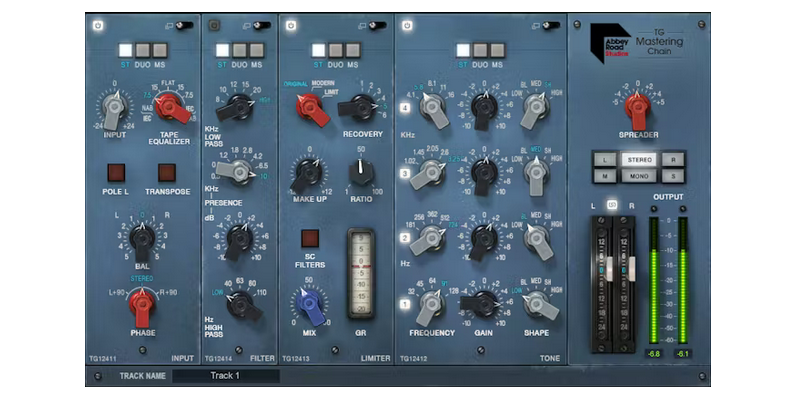
The Abbey Road TG Mastering Chain is a plugin that emulates the iconic EMI TG12410 transfer console used at Abbey Road, remaining faithful to the original while adding modern touches. It is known for its warm, analogue sound. If you want to achieve Abbey Road's sound, like Pink Floyd's or Radiohead's albums, this is a great plugin to have.
Abbey Road TG Mastering Chain's main feature is its iconic analogue tone. It is designed to add vintage warmth and colorful character to your music with the original five modules of the TG12410: Input, Tone, Limiter, Filter, and Output, which can now be reordered to create custom mastering chains tailored to your music.
Most modules can be switched between Stereo, Mid-Side (M/S), or Duo (dual mono) processing for advanced stereo width and balance. Overall, Abbey Road TG Mastering Chain is a reputable mastering plugin, but it may not suit every music due to its coloration. If you prefer to work with transparent plugins, this is not it.
You can purchase the Abbey Road TG Mastering Chain for $149, but it's often on sale with up to an 80% discount.
Pros:
- Renowned classic sound
- Mid-side processing
- Modular and re-roderable
- Features a dedicated metering plugin, TG Meter Bridge
Cons:
- It’s not a transparent plugin
- Fixed EQ Frequencies
- You may need to use a separate EQ and Limiter plugin
- Pronounced coloration
- CPU-intensive
FabFilter Mastering Bundle
The FabFilter Mastering Bundle is a suite of four essential, professional mastering tools from the FabFilter family. The included plugins are Pro-L2, Pro-Q 4, Pro-MB, and Pro-C 2, which is a better option than buying the individual products.
The four plugins included are:
- Pro-L 2 is a true peak limiter with multiple algorithms designed for specific genres and goals, and it has one of the most comprehensive metering systems with loudness standards and requirements in mind.
- Pro-Q 4 is a highly regarded EQ, considered one of the best on the market, with up to 24 bands, dynamic EQ functionality, linear phase mode, and exceptional spectrum visualization.
- Pro-MB is an intuitive, free-form, professional multiband compressor and expander that enables surgical frequency control.
- Pro-C 2 is a compressor plugin with eight different compression styles.
The FabFilter Mastering Bundle costs $519, making it a good choice if you're looking to get other FabFilter products at the best price. All the individual plugins offer a fully-functional 30-day trial.
Pros:
- High-quality and industry-standard plugins
- Comprehensive visualization
- Intuitive and user-friendly UI
Cons:
- Some producers find it "too clean."
- CPU-intensive
- Price
Steinberg WaveLab Pro

WaveLab Pro is another mastering tool that looks like any other DAW, but it is designed by Steinberg to address specific mastering needs. It offers a dedicated mastering environment, mastering tools, and a flexible workflow for mastering singles and albums, using digital plugins and external hardware.
Features like the Audio Montage are designed for album-level production, allowing you to arrange the songs in the right order, define markers, and streamline the mastering process. It features advanced LUFS metering and high-quality audio editing.
The mastering plugins built into WaveLab Pro include the MasterRig plugin, which features EQ, compressor, limiter, saturator, and imager modules that allow you to master audio intuitively and creatively with accuracy and flexibility.
Steinberg WaveLab Pro is $499 for the full version, and WaveLab Elements is $99, but with limited mastering features. It offers a 60-day unrestricted free trial of WaveLab Pro to try out the mastering tools.
Pros:
- Audio montage workflow
- Comprehensive analysis and metering features
- Built-in mastering plugins, including MasterRig
- Hardware integration
- Works as a recording and editing software too
Cons:
- Steep learning curve
- Price
LANDR Mastering Plugin
LANDR is well-known for its online mastering services for music producers, which have been offered for over a decade. Now, they have released a dedicated mastering plugin you can use in your DAW featuring their flagship AI mastering engine. The plugin has been well-received due to its speed and simplicity, offering professional-sounding results.
LANDR has always been popular among independent music producers and indie artists, and the plugin is still targeted at beginners and intermediate-level producers looking for a reliable mastering tool. The LANDR Mastering Plugin offers LANDR's core AI technology to analyze and apply personalized mastering to your tracks.
It offers three starting points: Warm, Balanced, and Open, depending on what sound you want to achieve. Other key features include real-time processing, a loudness meter, gain match, EQ, stereo width, and dynamics.
LANDR Mastering Plugin PRO license costs around $200, but you can check for recurrent sales on their webpage and subscription alternatives.
Pros:
- User-friendly
- DAW integration
- Three professional starting points (great for beginners)
Cons:
- Limited detailed control
- Requires a high-quality mix. Otherwise, it amplifies mix issues.
- CPU-intensive
Master Plan
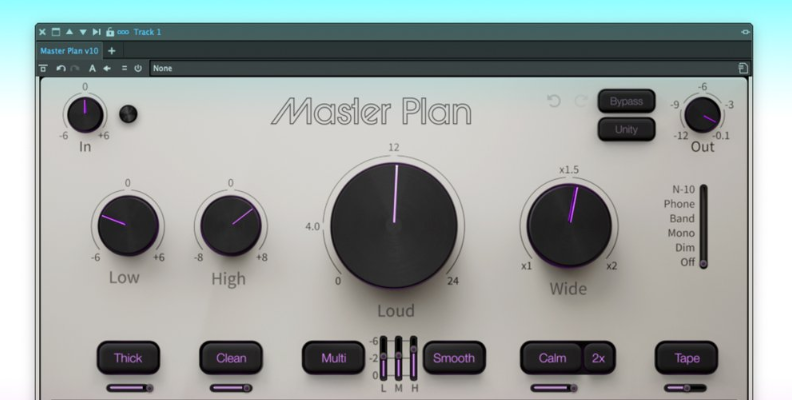
MusicHack’s Master Plan is another all-in-one mastering plugin designed to simplify the mastering process of your tracks. It offers several essential tools in a single, user-friendly interface to simplify, speed up, and make the process more flexible without compromising quality or professional sound.
The plugin is controlled by a few knobs, each with powerful processes behind it. Control loudness with a single knob that increases the signal level, combined with a limiter/clipper to maintain clarity and punch without distortion. Other knobs control low- and high-EQ shelves, tone shaping, stereo widening, imaging, and loudness compensation to adjust volume after processing.
Master Plan is a simple-to-use mastering plugin that can help you speed up your process. You can buy the Master Plan lifetime license for $175 or download a 10-day free trial to explore its features.
Pros:
- User-friendly, simple, and intuitive
- Smooth workflow
- All-in-one plugin
Cons:
- Limited parameters with fixed settings
- Missing spectral analysis and other advanced metering features
- The price is OK, but for that price, you could get other plugins that offer greater control and precision.
Elevate Mastering Bundle
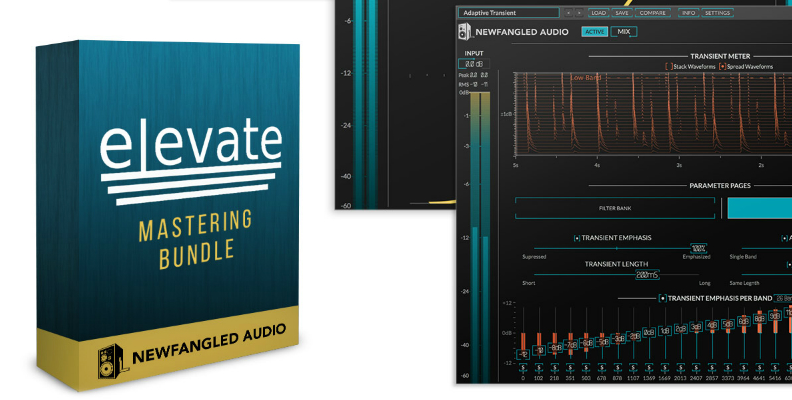
Developed by Nefwangled Audio, the Elevate Mastering Bundle is a set of plugins for mastering, providing transparent, loud, and dynamic results with intelligent, adaptive technology that simulates the human ear to create natural-sounding music without artifacts or distortion.
The featured plugins are EQuivocate, a graphic EQ modeled on the human ear; Punctuate, a multiband transient modulator; Saturate, a spectral clipper that allows you to overdrive your mix without affecting it; and the Elevate limiter with filter bands modeled on the human ear.
The license price is $199, but it often goes on sale for around $80. There's also a 14-day trial available for download.
Pros:
- Easy to get loud masters without distortion
- Adaptive technology streamlines the compression and limiter processes
- Allows for advanced and deep control
Cons:
- Steep learning curve for the advanced controls
- The Saturate plugin may be too aggressive for certain mixes
Oxford Limiter
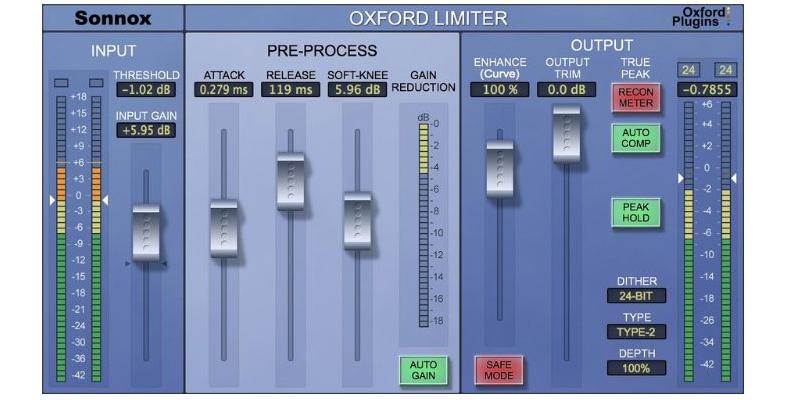
Oxford Limiter is widely used to achieve competitive loudness, maintaining transparency and presenting transients while pushing your mix to the limit. Unlike the other plugins on the list, Oxford limiter focuses on one thing: limiting, and it does it with excellence.
Oxford Limiter's key feature is the ability to increase the perceived loudness, density, and presence of an audio track by adjusting the dynamics and harmonics with flexible control over attack, release, knee, and gain. It also features a built-in true peak limiter that uses look-ahead processing to detect peaks.
Oxford Limiter sells for $269.
Pros:
- Achieves loudness without compromising audio quality
- True peak control
- Transparency
- Low CPU usage
Cons:
- Lack of visual feedback
- Price
Tokyo Dawn Records TDR Limiter 6 GE
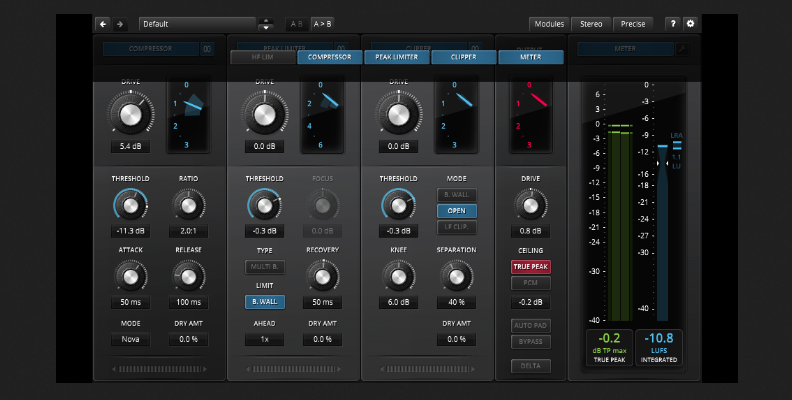
The TDR Limiter 6 GE is a dynamic compressor and limiter that features specialized modules for your main mastering processes, including loudness control, parallel compression, and true peak meters. Modules that can be rearranged to suit your music (except the last two).
TDR Limiter 6 GE's main feature lies in its six modules:
- Dynamic compressor for gain control, shaping, and dynamics.
- Clipper to shave off peak transients more aggressively than a peak limiter, but maintaining musicality.
- High-frequency limiter to control harsh frequencies and sibilances.
- Peak limiter to use as a brick-wall limiter to catch wild peaks.
- The output protection limiter is a fixed limiter for true peak control and setting the output ceiling.
- True Peak and EBU Loudness Meter to show comprehensive true peak and LUFS metering.
The first four modules (compressor, high-frequency limiter, clipper, and peak limiter) can be reordered by clicking and dragging them to the desired place in the chain or hiding them when not in use. Each of these four modules also provides Mid/side mode.
The TDR Limiter 6 GE plugin offers excellent value at around $50.
Pros:
- Comprehensive dynamic compressor and limiter toolkit
- Unbeatable value for the price
- Per module M/S processing
- Clean user interface
Cons:
- Steep learning curve
- Can add artifacts when pushed to the limit
Plugin Alliance BX_Mastering Studio
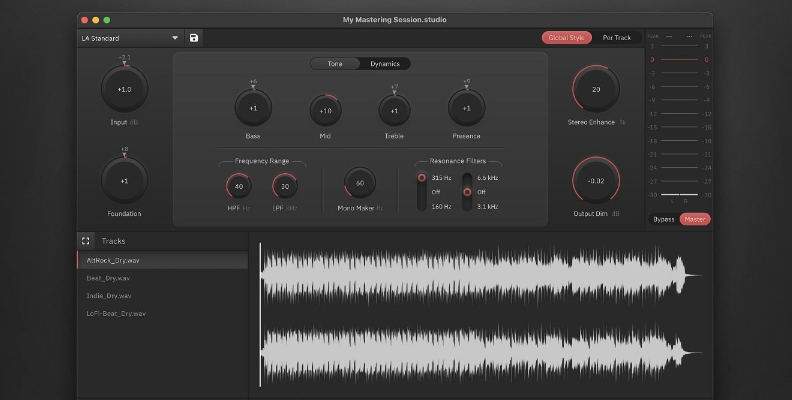
I am closing this list with a free alternative to all the plugins on this list. BX_Mastering Studio is a standalone, free desktop mastering application designed for quick, high-quality mastering without a DAW.
BX_Mastering Studio features machine-guided mastering trained with masters from Grammy-winning engineers. It offers 11 master styles to shape your sounds, each targeting specific genres and content types. The batch mastering feature lets you master albums at HD output resolution.
It includes a 3-band EQ, presence control, high-pass and low-pass filters, compression, harmonics, de-esser, limiting, and onboard metering.
Pros:
- Free
- No DAW needed
- 11 mastering styles
- Intuitive UI
- Batch processing
- Alternative to basic DAWs and audio editors without proper mastering tools
Cons:
- Limited controls and flexibility
- Basic metering
- Not for professional work
How to Choose the Right Mastering Plugins
Price
Mastering plugins have a wide range of prices. There are free plugins, affordable plugins, and plugins that cost hundreds of dollars. You'll have to define an estimated budget to narrow your options; if you have a flexible or high budget, you can start with professional, industry-standard plugins without worrying about making a mistake.
If you have an ultra-low budget, especially if you are a beginner, I suggest spending on a DAW and using its stock mastering plugins, and also consider free plugins. A good option for low to medium budgets is buying all-in-one suites, which offer more value for the price than buying individual EQ, compressors, and limiters.
CPU Efficiency and Compatibility
Research what plugins are compatible with your operating system. Most plugins nowadays are multiplatform, but a few only work on Windows or Mac. Start by narrowing your options to the plugins you can run on your system. Then, check the requirements for CPU processing and storage. Many mastering plugins are very CPU-intensive.
Workflow and UI
An important thing is the plugin workflow and user interface. A sloppy interface and workflow can turn a good-sounding plugin into a nightmare experience. We all look for tools that help us work faster and better. Search for those that offer a great user experience, are clear about what they are doing, and perform well without crashing.
Sound Goals
What are you looking to achieve with your masters? Define whether you want transparency for corrective work (like FabFilter) or if you prefer a plugin that adds character to enhance the sound (like the Abbey Road TG Mastering Plugin).
Individual vs. Bundle
You'll often find more value from a plugin bundle. However, there's also a chance you want to upgrade specific tools from your stock plugins and prefer to look for individual plugins. You may use the EQ from FabFilter, but prefer the Oxford Limiter and your stock compressor. Find what brings more value to you.
Final Words
To ensure your music reaches professional levels, you must learn the basics behind every production tool you use. Start by learning the theory with the tools you have at your disposal, and when you want to expand the features, use our buying guide to narrow your options and keep in mind the things that make a great mastering plugin.
For an all-in-one DAW solution, try Samplitude for free. You get a full-featured professional DAW with complete recording, editing, mixing, and mastering tools. You're also ready to work with immersive audio, thanks to Dolby Atmos support.
Keep practicing, mixing, mastering, and creating good music.
Good luck!